



A shipping platform brings multiple logistics processes into a single system, so your business doesn’t have to deal with each carrier separately. It acts as a central hub where you can compare delivery options, process orders, generate shipping labels, and track statuses — all in one place. By pooling shipping volumes across users, these platforms often unlock lower carrier rates as well.
One of the most popular shipping platforms in Latvia is Swotzy. It offers shipping with every leading Latvian carrier and provides modern shipment management for both domestic and international markets. With Swotzy, businesses across Latvia and the rest of Europe have already shipped more than 758,000 parcels worldwide.
To understand the value of a platform, let’s look at the standard process almost every growing e-commerce business runs into when it isn’t yet using automation. It’s time-consuming and technically complex. Here’s what shipping looks like without — and with — a shipping platform.
In other words, a shipping platform takes on nearly all of the technical logistics load. It automatically talks to carrier systems, pulls live rates, prepares the necessary documents, and refreshes tracking data on its own. You’re left with just the key tasks: setting up the right delivery options in your store and sending parcels out.
Not all shipping platforms offer the same toolset. Like other digital products, they can ship with fewer or more capabilities.
The modern ones typically include:
Let’s take a closer look at what these features actually mean and how they work inside a shipping platform.
Shipping platforms bring multiple carriers and their service options together. The sender can pick any of them without having to sign individual contracts with each carrier.
How it works:
To compare prices, you enter the required information into the shipping platform — sender and recipient addresses, parcel dimensions, and weight. The platform then displays all current offers, sorted by price, with estimated delivery times and how the parcel would be delivered to the customer (e.g. by courier or to a pickup point).
This way the sender can accurately review and pick the best option for each shipment type.
These features dramatically cut the time spent researching carriers and choosing services. Instead of visiting each carrier’s site, you can see all offers in seconds.
One of the core features of a shipping platform is making shipment creation simple. Instead of building them in separate systems, shipments are created in one place.
Typically, you can add shipment data to the platform in three ways:
Connecting your store opens up more possibilities — most importantly, it lets you set up shipping rules (more on that below). When a customer places an order, their information and chosen delivery method land in the shipping platform automatically, so the sender can prepare the parcel for dispatch in seconds.
Shipping platforms offer simple connections, or integrations, with e-commerce platforms like Shopify, Etsy, WooCommerce, Mozello, Magento and others. If your store is custom-built or runs on a non-standard platform, the connection can be made via API.
.png)
When orders flow into the shipping platform automatically, the sender can manage them in a single, convenient window — the dashboard.
The platform typically displays:
Here the sender can easily keep track of every order — filter, sort, and process them as they see fit.
Without this kind of centralized dashboard, e-commerce businesses often rely on multiple separate tools: their store admin, individual carrier systems, Excel or other spreadsheets, and a lot of manual copying between them.
Integration lets you configure delivery options and rules for each customer region and product type.
For example, by adding the Swotzy app to Shopify, the sender can configure in their store:
Shipping rules can look like this:
Combine these rules with the platform’s automatic shipment data fill, and the order is essentially ready. All that’s left is to generate the shipping label and, if needed, attach customs information before scheduling a courier or dropping parcels at lockers.
Once a shipment is filled in, there are three main steps in the platform before the parcel is dispatched.
1. Filling in customs information.
If a parcel is traveling outside the European Union, the platform makes it easy to fill in the required customs fields, including product description, HS code, product value, country of origin, and other essentials. From the same screen, the sender can choose who pays the duties: the sender (DDP) or the recipient (DAP).
Based on the data entered, the platform automatically generates official documents, which the chosen carrier then passes to the relevant authorities. If the sender prepares commercial invoices (which also contain customs information) separately, those can be uploaded into the platform.
The shipping platform prepares:

2. Generating shipping labels
Once shipment details are filled in and a carrier service is selected, you can generate shipping labels in the platform. You can create them one at a time or all at once (bulk label printing) if you have many orders.
3. Dispatch
Once labels are on the parcels, the sender has two options: 1. book a courier from the platform for the time and date that works best, 2. drop parcels off at lockers. Which option applies depends on the dispatch method chosen. Delivery methods are visible in the shipment details on the platform’s shipments overview page.
Once a shipment is sent, it can be marked as fulfilled, and its status will automatically update in your online store as well. This creates a tidy, transparent management environment that makes it easy to keep track of changes in shipment processing.
Instead of searching across ten different carrier websites, the sender sees all tracking numbers in one view. Clicking on them opens real-time status updates.
That helps you quickly inform customers about delivery progress and make sure parcels arrive on time.
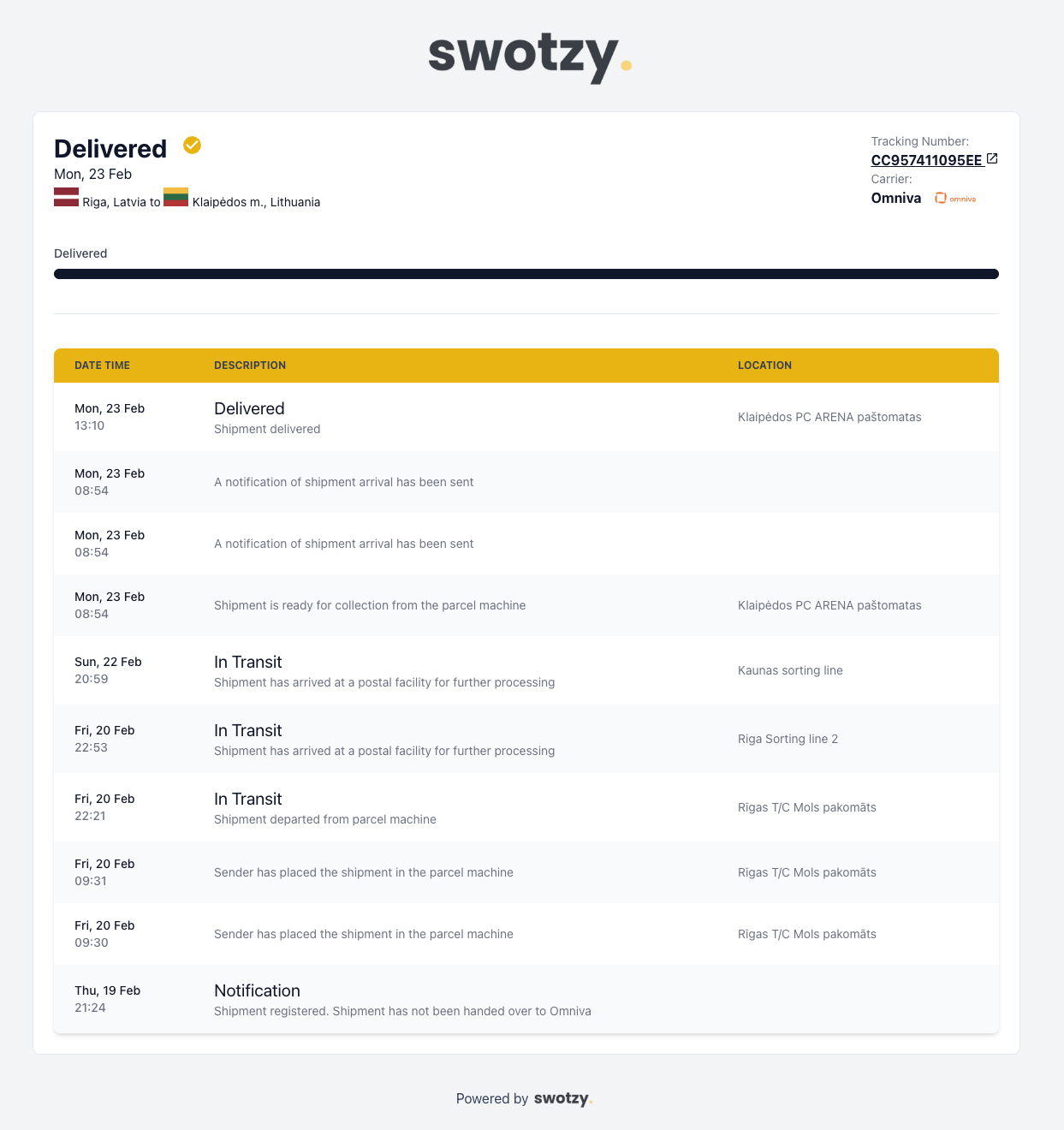
The shipping platform gives users a valuable overview they can use to refine their delivery strategy.
For example, if analytics show that a large share of orders to Germany are sent with a specific carrier, but the average delivery time is slower than with another service, the sender can rethink their carrier choice strategically.
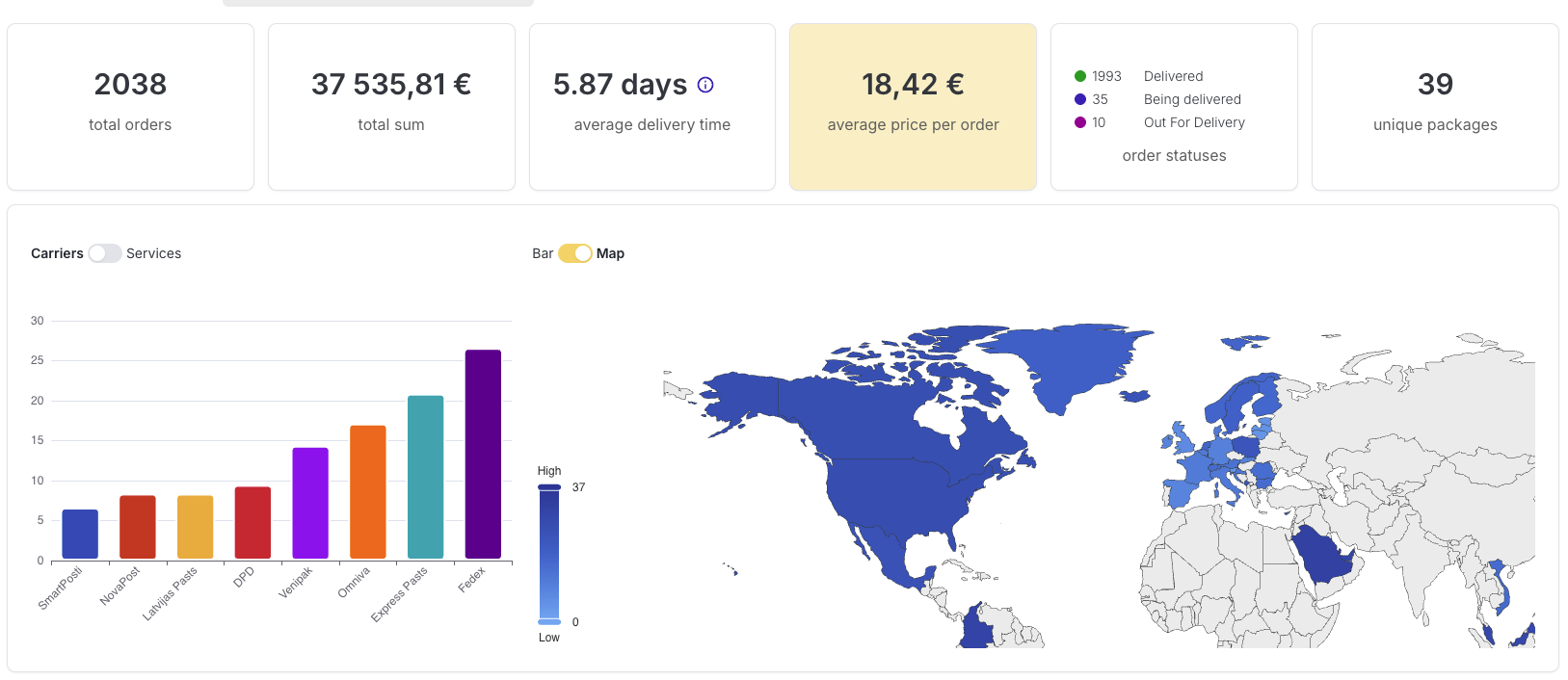
What analytics show:
As an e-commerce business’s order volume grows, so does the chance that parcels get lost, are delivered incorrectly, or that invoices need to be disputed. That’s an unavoidable part of working with carriers. Carrier customer service teams (Latvijas Pasts, FedEx, etc.) usually resolve these issues reasonably well, but turnaround can be slow.
The Swotzy customer support team coordinates communication with carriers quickly, handles discrepancies and insurance claims, and helps you understand both the shipping process and the platform itself.
If your business already has contracts in place with carriers, you can add them to the shipping platform. That lets you use your pre-negotiated rates, compare them against the platform’s options, and pick the better deal between the two.
Shipping platforms often offer better rates than you’d get signing contracts with carriers individually. That’s because the platform pools the shipping volumes of its users, sending more order flow to carriers. The more shipments processed through the platform, the better the rates it can secure.
Swotzy, for example, provides enterprise-grade rates with simplified terms — no long-term contracts or volume commitments. Discounts on shipments can in some cases reach up to 65%.
Fast carrier comparison can also significantly reduce overall logistics costs. When the sender has every carrier’s offer in front of them, they can pick the most cost-effective option every time it pays off.
Businesses typically save substantial time, because day-to-day logistics work is centralized and automated.
To illustrate the time savings: by using the Swotzy platform for shipment management, True Story cut the time spent on logistics by more than half, while for lovers and trees saves around 3 hours a day. These examples show how a centralized, automated shipping system can become a meaningful driver of business growth.
A business that starts out shipping just a handful of parcels a day can gradually scale to hundreds of shipments without hiring more people — automation rules and centralized shipment processing ensure that even rapidly growing volume gets handled quickly and at consistent quality.
On top of that, given the shipping rates on offer, e-commerce stores find it easy to open new markets simply by adding shipping regions and the relevant carriers in their store.
An e-commerce business of any size can sign up for a shipping platform and start using it without complicated implementation.
Here’s how to get started with the Swotzy platform — let’s say you’re creating a single test shipment manually:
The platform handles all the technical work for you. It automatically talks to carrier systems, pulls live rates, passes shipment information along, creates electronic documents, and continuously updates tracking data — no manual involvement required.
Every e-commerce business that ships parcels to customers can use a shipping platform, but it becomes especially useful once order volume grows and manual shipment management starts eating up real time.
Specific signals:
It’s always worth weighing the available tools and what they offer, but cost matters too. Some platforms are free to use (Swotzy), while others charge a subscription. If a platform offers competitive rates and provides support that makes the work meaningfully easier, even small online stores benefit from it.
The best way to find out whether it’s right for you is to try it.
A shipping platform brings multiple logistics processes into a single system, so your business doesn’t have to deal with each carrier separately. It acts as a central hub where you can compare delivery options, process orders, generate shipping labels, and track statuses — all in one place. By pooling shipping volumes across users, these platforms often unlock lower carrier rates as well.
One of the most popular shipping platforms in Latvia is Swotzy. It offers shipping with every leading Latvian carrier and provides modern shipment management for both domestic and international markets. With Swotzy, businesses across Latvia and the rest of Europe have already shipped more than 758,000 parcels worldwide.
To understand the value of a platform, let’s look at the standard process almost every growing e-commerce business runs into when it isn’t yet using automation. It’s time-consuming and technically complex. Here’s what shipping looks like without — and with — a shipping platform.
In other words, a shipping platform takes on nearly all of the technical logistics load. It automatically talks to carrier systems, pulls live rates, prepares the necessary documents, and refreshes tracking data on its own. You’re left with just the key tasks: setting up the right delivery options in your store and sending parcels out.
Not all shipping platforms offer the same toolset. Like other digital products, they can ship with fewer or more capabilities.
The modern ones typically include:
Let’s take a closer look at what these features actually mean and how they work inside a shipping platform.
Shipping platforms bring multiple carriers and their service options together. The sender can pick any of them without having to sign individual contracts with each carrier.
How it works:
To compare prices, you enter the required information into the shipping platform — sender and recipient addresses, parcel dimensions, and weight. The platform then displays all current offers, sorted by price, with estimated delivery times and how the parcel would be delivered to the customer (e.g. by courier or to a pickup point).
This way the sender can accurately review and pick the best option for each shipment type.
These features dramatically cut the time spent researching carriers and choosing services. Instead of visiting each carrier’s site, you can see all offers in seconds.
One of the core features of a shipping platform is making shipment creation simple. Instead of building them in separate systems, shipments are created in one place.
Typically, you can add shipment data to the platform in three ways:
Connecting your store opens up more possibilities — most importantly, it lets you set up shipping rules (more on that below). When a customer places an order, their information and chosen delivery method land in the shipping platform automatically, so the sender can prepare the parcel for dispatch in seconds.
Shipping platforms offer simple connections, or integrations, with e-commerce platforms like Shopify, Etsy, WooCommerce, Mozello, Magento and others. If your store is custom-built or runs on a non-standard platform, the connection can be made via API.
When orders flow into the shipping platform automatically, the sender can manage them in a single, convenient window — the dashboard.
The platform typically displays:
Here the sender can easily keep track of every order — filter, sort, and process them as they see fit.
Without this kind of centralized dashboard, e-commerce businesses often rely on multiple separate tools: their store admin, individual carrier systems, Excel or other spreadsheets, and a lot of manual copying between them.
Integration lets you configure delivery options and rules for each customer region and product type.
For example, by adding the Swotzy app to Shopify, the sender can configure in their store:
Shipping rules can look like this:
Combine these rules with the platform’s automatic shipment data fill, and the order is essentially ready. All that’s left is to generate the shipping label and, if needed, attach customs information before scheduling a courier or dropping parcels at lockers.
Once a shipment is filled in, there are three main steps in the platform before the parcel is dispatched.
1. Filling in customs information.
If a parcel is traveling outside the European Union, the platform makes it easy to fill in the required customs fields, including product description, HS code, product value, country of origin, and other essentials. From the same screen, the sender can choose who pays the duties: the sender (DDP) or the recipient (DAP).
Based on the data entered, the platform automatically generates official documents, which the chosen carrier then passes to the relevant authorities. If the sender prepares commercial invoices (which also contain customs information) separately, those can be uploaded into the platform.
The shipping platform prepares:
2. Generating shipping labels
Once shipment details are filled in and a carrier service is selected, you can generate shipping labels in the platform. You can create them one at a time or all at once (bulk label printing) if you have many orders.
3. Dispatch
Once labels are on the parcels, the sender has two options: 1. book a courier from the platform for the time and date that works best, 2. drop parcels off at lockers. Which option applies depends on the dispatch method chosen. Delivery methods are visible in the shipment details on the platform’s shipments overview page.
Once a shipment is sent, it can be marked as fulfilled, and its status will automatically update in your online store as well. This creates a tidy, transparent management environment that makes it easy to keep track of changes in shipment processing.
Instead of searching across ten different carrier websites, the sender sees all tracking numbers in one view. Clicking on them opens real-time status updates.
That helps you quickly inform customers about delivery progress and make sure parcels arrive on time.
The shipping platform gives users a valuable overview they can use to refine their delivery strategy.
For example, if analytics show that a large share of orders to Germany are sent with a specific carrier, but the average delivery time is slower than with another service, the sender can rethink their carrier choice strategically.
What analytics show:
As an e-commerce business’s order volume grows, so does the chance that parcels get lost, are delivered incorrectly, or that invoices need to be disputed. That’s an unavoidable part of working with carriers. Carrier customer service teams (Latvijas Pasts, FedEx, etc.) usually resolve these issues reasonably well, but turnaround can be slow.
The Swotzy customer support team coordinates communication with carriers quickly, handles discrepancies and insurance claims, and helps you understand both the shipping process and the platform itself.
If your business already has contracts in place with carriers, you can add them to the shipping platform. That lets you use your pre-negotiated rates, compare them against the platform’s options, and pick the better deal between the two.
Shipping platforms often offer better rates than you’d get signing contracts with carriers individually. That’s because the platform pools the shipping volumes of its users, sending more order flow to carriers. The more shipments processed through the platform, the better the rates it can secure.
Swotzy, for example, provides enterprise-grade rates with simplified terms — no long-term contracts or volume commitments. Discounts on shipments can in some cases reach up to 65%.
Fast carrier comparison can also significantly reduce overall logistics costs. When the sender has every carrier’s offer in front of them, they can pick the most cost-effective option every time it pays off.
Businesses typically save substantial time, because day-to-day logistics work is centralized and automated.
To illustrate the time savings: by using the Swotzy platform for shipment management, True Story cut the time spent on logistics by more than half, while for lovers and trees saves around 3 hours a day. These examples show how a centralized, automated shipping system can become a meaningful driver of business growth.
A business that starts out shipping just a handful of parcels a day can gradually scale to hundreds of shipments without hiring more people — automation rules and centralized shipment processing ensure that even rapidly growing volume gets handled quickly and at consistent quality.
On top of that, given the shipping rates on offer, e-commerce stores find it easy to open new markets simply by adding shipping regions and the relevant carriers in their store.
An e-commerce business of any size can sign up for a shipping platform and start using it without complicated implementation.
Here’s how to get started with the Swotzy platform — let’s say you’re creating a single test shipment manually:
The platform handles all the technical work for you. It automatically talks to carrier systems, pulls live rates, passes shipment information along, creates electronic documents, and continuously updates tracking data — no manual involvement required.
Every e-commerce business that ships parcels to customers can use a shipping platform, but it becomes especially useful once order volume grows and manual shipment management starts eating up real time.
Specific signals:
It’s always worth weighing the available tools and what they offer, but cost matters too. Some platforms are free to use (Swotzy), while others charge a subscription. If a platform offers competitive rates and provides support that makes the work meaningfully easier, even small online stores benefit from it.
The best way to find out whether it’s right for you is to try it.
Free to join. Free to use. Only pay for shipped orders.
Whether you’re just starting out or scaling fast, Swotzy helps you save on shipping, manage all your deliveries better, and keep your shipping process simple and efficient.